- Version: 1.0.12
- Price: Free
- Operating system: Windows XP/Vista/7
- File size 17.0 MB
- File name 4d.exe
- License model Free
- Limitations Not available
- Price Not available
2011-04-06
SPECIFICATION

UPDATES
The movie has been changed into a documentary type video taken from the national geographic channel which explains further the idea of time travel and worm holes in space. The voiceover explains the vortex's of wormholes and the video illustrates this. Some of the sound is out of sync due to the conversion between mp4 to flv, this was done by adobe media encoder but does not make that much of a difference on the outcome.
The scientist character has been removed and replaced with pictures of wormholes in space, this makes the look of the software more professional and keeps the theme going all the way through. The press space and logo is the same but looks better now as there is a picture of space and the space button initiates the software.
The glow effect has been changed to come into effect when the dimensions are visited, this shows how far through the program the user has got and allows for a much easier visualisation of their progress. 5 pixels are increased every time each button is pressed.
The slider that the user uses to shift between the time of the movie has been repositioned to the middle of the screen where the original reality line is, when the user presses a dimension key the ultimate realities are displayed above and below this bar, this makes the interaction a lot smoother and easier to use for the user.
2011-02-24
References
National Geographic, 2005
website
http://www.nationalgeographic.com/
archive
http://news.nationalgeographic.com/news/2005/09/0916_050916_timetravel.html
Daffy Duck's Quackbusters, 1988
imdb
http://www.imdb.com/title/tt0094939/
wiki
http://en.wikipedia.org/wiki/Daffy_Duck%27s_Quackbusters
Stargate, 1994
imdb
http://www.imdb.com/title/tt0111282/
wiki
http://en.wikipedia.org/wiki/Stargate
The Circus, 1928
imdb
http://www.imdb.com/title/tt0018773/
wiki
http://en.wikipedia.org/wiki/The_Circus_%28film%29
Family Guy - Road to Germany, 1999
imdb
http://www.imdb.com/title/tt1293322/
wiki
http://en.wikipedia.org/wiki/Road_to_Germany
Microsoft Tech-Ed, 2004
youtube
http://www.youtube.com/watch?v=B2G4Y_IaKTI
wiki
http://en.wikipedia.org/wiki/Emmett_Brown#Microsoft_TechEd
Terminator 2: Judgement Day, 1991
imdb
http://www.imdb.com/title/tt0103064/
wiki
http://en.wikipedia.org/wiki/Terminator_2:_Judgment_Day
Timecop, 1994
imdb
http://www.imdb.com/title/tt0111438/
wiki
http://en.wikipedia.org/wiki/Timecop
Back to the Future Part II, 1989
imdb
http://www.imdb.com/title/tt0096874/
wiki
http://en.wikipedia.org/wiki/Back_to_the_future_2
Sphere, 1998
imdb
http://www.imdb.com/title/tt0120184/
wiki
http://en.wikipedia.org/wiki/Sphere_%28film%29
Books
- Abbott, Edwin A. Flatland: A Romance of Many Dimensions http://www.geom.uiuc.edu/~banchoff/Flatland/
- Baudrillard J, The Ecstasy of Communication, Postmodern Culture, Pluto Press, 1983. Baudrillard J, The Gulf War Did Not Take Place, Power Publications, 1991.
- Dawkins, Richard. 1976. The Selfish Gene. Oxford: Oxford University Press
- Dunlop, G. Ed, 'The Work of Art in the Electronic Age', from original interviews transmitted by Illuminations on La Sept TV, May 8th 1987, translated and transcribed for, Block 14, 1988.
- Fields, S. 'Sighting Snow', Afterimage, Nº 11, 1982/3. Jaques Lacan, 'The Mirror Stage as Formative of the I As Revealed in Psychoanalytic Experience', Ecrits, Routledge, 1977.
- Freitas, Robert A. Merkle, Ralph C. 2004. Kinematic Self-Replicating Machines. Georgetown, TX: Landes Bioscience
- Hesse, Mary. B. 1961. Forces and Fields. London: Nelson Hill, Jonathan. 2006. Immaterial Architecture. Oxen: Routledge
- Hill, G. Henry Art Gallery, University of Seattle, 1995.
- Hill, G. In Light of the Other, Museum of Modern Art, Oxford/Tate Gallery, Liverpool, 1993.
- Kauffman, S. 1995. At Home in the Universe: The Search for the Laws of Self-Organization and Complexity. New York: Oxford University Press
- Mc Taggart, Lynne. 2003. The Field. London: HarperCollins Publishers
- Negroponte, N. Being Digital, Coronet Books, 1995
- Druckery, T. ed. Electronic Culture, Aperture Foundation Books ltd, 1996
- Popper, F., Art in the Electronic Age, Thames and Hudson, 1993 Art & Design Journal, Installation Art, 1-85490-213-X
- Regina Cornwell, interview with Gary Hill, Art Monthly, v170, 1993.
- Spiller, Neil. “Reflexive Architecture.” Architectural Design, Vol 72 No 3 February 2002
- Spiller, Neil, ed. 2002. Cyber_Reader: Critical Writings for the Digital Age. Phaidon
- Stiles, K, et al. Theories and Documents of Contemporary Art. Uni of California Press, 1996
- Virilio, P. The Vision Machine, bfi Indiana, 1994. Exhibition Catalogues
- Yates, Francis. 1966. The Art of Memory. Routledge
Criteria

Imagining space as a curved, two-dimensional plane, wormholes like this
could be formed by two masses applying enough force on spacetime to create a tunnel connecting distant points in the universe.
Hyperspace is the transmission into the conventional space, this is said to be created by wormholes however time travel has not yet been proven TMK. Hyperspace travels at such a speed that it almost seems instantaneous, therefore if we were to reconstruct the experience of travelling through hyperspace then minimal would happen except the environment would change. The travel between earth and sirius through the hyperspace could cause a dramatic effect on the spacetime continuum and can manifest a new reality in a difference space of time.
 |
| dfsdf |
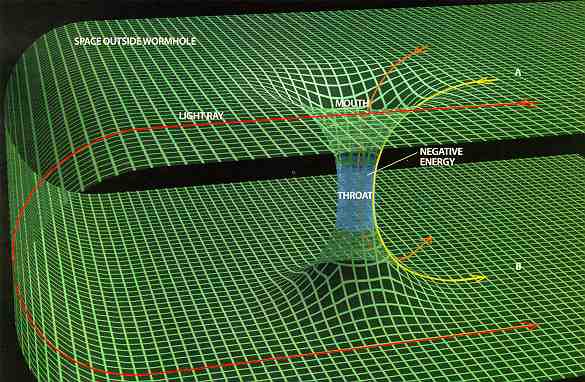 |
In physics, a wormhole is a hypothetical topological feature of spacetime that would be, fundamentally, a "shortcut" through spacetime. For a simple visual explanation of a wormhole, consider spacetime visualized as a two-dimensional (2D) surface. If this surface is folded along a third dimension, it allows one to picture a wormhole "bridge".
A trip into the past or the future puts the participant in the same place at a different time thus creating a ultimate reality for that time traveller. The butterfly effect means that the bigger changes cause ripple like effects that can effect the future however small or insignificant they are. A disruption in the space time contiuum will create a new temporal even sequence resulting into the alternate reality in the future.


Growing or shrinking R with time means expanding or
collapsing universe, depending on the mass density inside
R = Time
The equation above represents the mass of a hypersphere, R is the distance away from a fixed point, changing this changes time.
An example of a paradox:

If a time traveller travelled back in time and killed his grandfather before he met his grandmother then he would never have been concieved therefore be unable to kill his grandfather and would be concieved, go back im time and kill his grandfather. This is known as the grandfather paradox.
Output

1

The interval number is the number of the timeline at the place initialled travelled. This is the lock position for each dimension, the initial time is important because this time cannot be changed after the user has used that dimension for the first time. If this was realtime time travel this number would represent time, e.g. the year.
2


The fourth dimensioner can use each dimension up to 15 times, when all 15 journeys are used the number will turn red and be locked, this means the user can no longer teleport to that time. This is the same for each of the dimensions.
3

A hypersphere will build up when the user uses a dimension, after 10 reality journey's the hypersphere will start flashing red and at 15 will remain red. This is shown in the information box at the bottom of the page.
4

The top slider creates a paradox in the timeframe, this freezes the video and adds a blur or glow to the outside of the screen depending on the scale or feedback from the slider. The sound will continue as time would continue but the outcome is different.
5
The bottom slider allows the user to change the interval in the time space, the slider will take them to different parts of the video for fast navigation. The time is not set until the user presses a dimension key for the first time.
6

The glow created by the top slider fills half the mass of the screen at maximum and contains a still image of the video behind it. When another dimension is used the video will continue. The hyperspheres for each dimension are displayed across the middle of the video.
Plan of Work

- Logo Design
- Process Idea
- Pseudo Code
First Page
- Logo - insert the logo and position it on the screen. ☑
- Title - infront/behind the logo. ☑
- Picture - relative picture inserted and positioned. ☑
- Introductory Text - a quote or abstract of 4d. ☑
- Next Page - link to the next page. ☑
- Title - insert title again. ☑
- Logo - add the logo to the page. ☑
- Instructions - tell the user how to use the program. ☑
- Controls - a diagram of the above. ☑
- Next Page - link to advance. ☑
- Game Over - tell the user it is over. ☑
- Return - allow restart of the program. ☑
- Logo - ☑
- Title - ☑
Video
- Video - insert a video. ☑
- Sound - including sound. ☑
- Controls - the controls work. ☑
- Slider - advance the video at will. ☑
- Timer - to end the program.
- Reset - start again. ☑
Development
First Page


The logo uses the digital-7 font described in the 'title' section of the project proposal, to make this more fascinating and interesting I added a 3d square in the background which rotates and moves around while the page is loaded. I think this makes the program look more interact and appealing to the user, it also makes the background stand out.
I decided to use a character for the program, as time travel is involved the first person that come to my head was a nutty scientist similar to "Emmett Brown" of the Back to the Future trilogy, but to save hassle of copyright and to be original I found a clipart image of a scientist who just so happened to look as loops as Dr. Brown but was better to fill in my empty space at the bottom of the page, to bring the 4d perspective into light I put a quote from a wiki page describing what the fourth dimension is.
Using the same font as the title the user is prompted to press space to enter to the next screen (next page), I thought this was more interactive as the user can keep their hands on the keyboard without moving the mouse so much. This is done using the KeyDown method in actionscript 3 libaries. This will flash to stand out similar to "insert coins" on arcade games.
"in modern physics, space and time are unified in a four-dimensional Minkowski continuum called spacetime, whose metric treats the time dimension differently from the three spatial dimensions. Spacetime is thus not a Euclidean space."

Control Page

The control page was kept simple to allow the user to understand it more easily, the button controls are the main inputs and are the largest on the page. Pressing space enters the video screen, this is displayed in white on the right of the screen so it stands out. The title and logo are a little bit different on this screen. The scientist is in the same position as the title page with a different quote:
"It could mean that that point in time inherently contains some sort of cosmic significance. Almost as if it were the temporal junction point fors the entire space-time continuum. On the other hand, it could just be an amazing coincidence. "

Video Page

The logo on the video page is smaller and located on the top right of the screen. The hyperspace are bright green to match the theme of the program, this time the scientist is displaying the users dimension information and sliders for the paradox's and journey's. The slider event was imported in the AS3 and a method was made to play the selected frame in the timeframe to play:

Going to the 0 timeframe is not allowed as it would cause a paradox, the maximum is set to the maximum frames in the video. The keydowns for the dimensions are constucted of different if statements and commands.
If the video is playing then that means it is the right page so that the dimension number can be incremented and checked whether it is below 15, if it is the first time it has been used then the number will turn green and the frame will be stored in a variable, this is the destination for that dimension. The number will be put into a temporary variable that will be turned into a string and displayed in the interval number text box on the screen. Each time a dimension is used it will play the destination point, increment the number of times it has been used and increment the hypersphere for that dimension (key being used) until it has reached 15, at this point the number will turn red and will become inactive.


Game Over Page

The main page and game over page are the largest as they are the most important and have to stand out, they also contain the least information.
The gane over page is a combination of static and dynamic texts with images. The animated logo returns the user to the first screen and the quote suggest's that there has been a paradox and they are out of time.
"I foresee two possibilities. One, coming face to face with herself 30 years older would put her into shock and she'd simply pass out. Or two, the encounter could create a time paradox, the results of which could cause a chain reaction that would unravel the very fabric of the space time continuum, and destroy the entire universe! Granted, that's a worse case scenario. The destruction might in fact be very localized, limited to merely our own galaxy."

Project Summary
My idea works on the theory of time and how a 4d element would only be visible as it is for that moment in time before it shape shifts into something else.
If we could bend time maybe it would be possible to come face to face with the 4d being or possibly create a better understanding of what it is. In the same sense, this could also be a interface for a 4d element in a 3d world.
My idea is to take a video and create a interface that lets the user skip through time at choice, moving backwards and forwards through time at will and manipulate it.
I want the user to be able to go back to a point in time and create a different opinion of it by seeing it again, what might of seemed like a innocent conversation at first could actually turn out to be a plot against another character for example and being able to go back to that time the conversation took place means that we can watch it through and understand what dialogue and interpretation was really happening or anything else that we missed.
I want to limit the amount of times that the user can do this to give in authenticity among other things as doing something over and over again becomes boring and I would like the program to be more popular than that and have multiple users playing with the same interface.
The video used I have not decided but I would like something that has a time travel theme or possibly a reason to time travel in need to understand what the plot of the story is. The video will be uploaded directly but can be changed by the user if it is put into the .fla file (if they have it).
The fourth dimension is a unknown reality for humans and animals living in the real world, but if we ever move out of our 3d environment I believe it will be through time travel.
Title

The title I want to use relates to module's name '4d' and is called "the fourth dimension". For the background I want it to be a neutral colour that is easy on the eyes, this means either: black, grey or white. Paper is often coloured light yellow to aid the eyes, this opens my options up for background colours. The program will have a logo, related to the title I would like it to represent the features or be a picture of something used in the program. Here are some designs:
I chose the middle design to begin with whilst designing and creating the program in flash, with some animation the logo could come to life and it is not long to change the logo if needed. The fonts have been downloaded via dafont.com and are free to use, the filenames are: cheri.ttf and digital7.ttf.

2011-02-14
Specification
- Version: 1.0.12
- Price: Free
- Operating system: Windows XP/Vista/7
- File size 17.0 MB
- File name 4d.exe
- License model Free
- Limitations Not available
- Price Not available
Subscribe to:
Posts (Atom)